
Download the IGNOU Assignment Submission Slip PDF and print it on A4 paper before submitting your hard-copy assignments. The form has space for student details, centre information and up to 16 assignment codes.
After handing over the assignments, ask the receiving staff to enter the date and add the receiver’s signature and official stamp. Keep the acknowledged slip safely because it can help you show when and where the assignments were submitted.
The student sections should be completed before submission. The lower section marked “For Office Use Only” must be left blank for the receiving staff.
Download IGNOU Assignment Submission Slip PDF
The blank form below is suitable for A4-size printing. Enter your student and assignment details before visiting the Study Centre. Do not write in the office section.
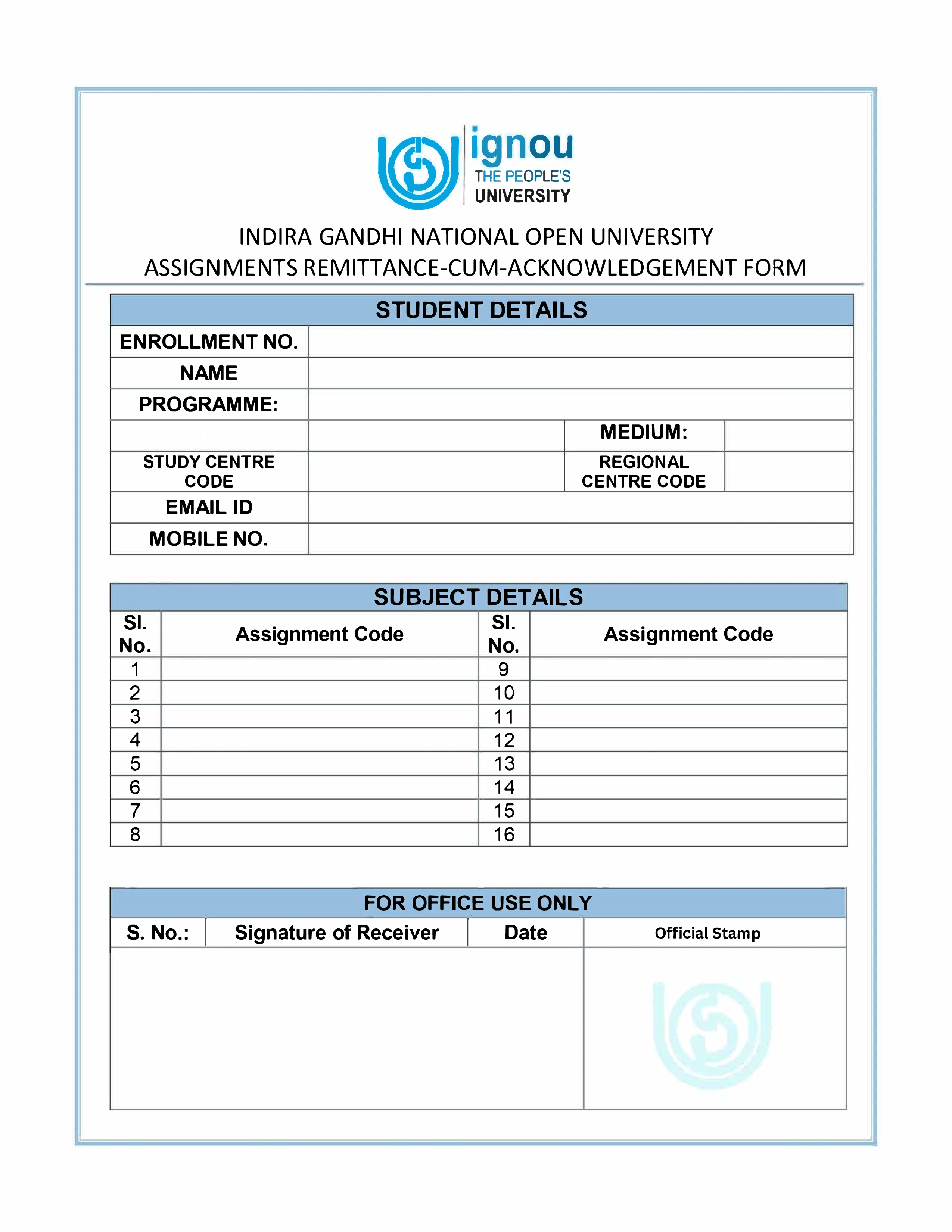
The form contains separate fields for Programme and Medium, contact details, Study Centre and Regional Centre codes, and 16 rows for Assignment Codes. Use only the number of rows required for the assignments being submitted.
Filled IGNOU Assignment Submission Slip Sample
The filled sample below shows where to enter the student details, programme, medium, centre information and assignment codes. The office serial number, receiver’s signature, date and official stamp must be left for the Study Centre.
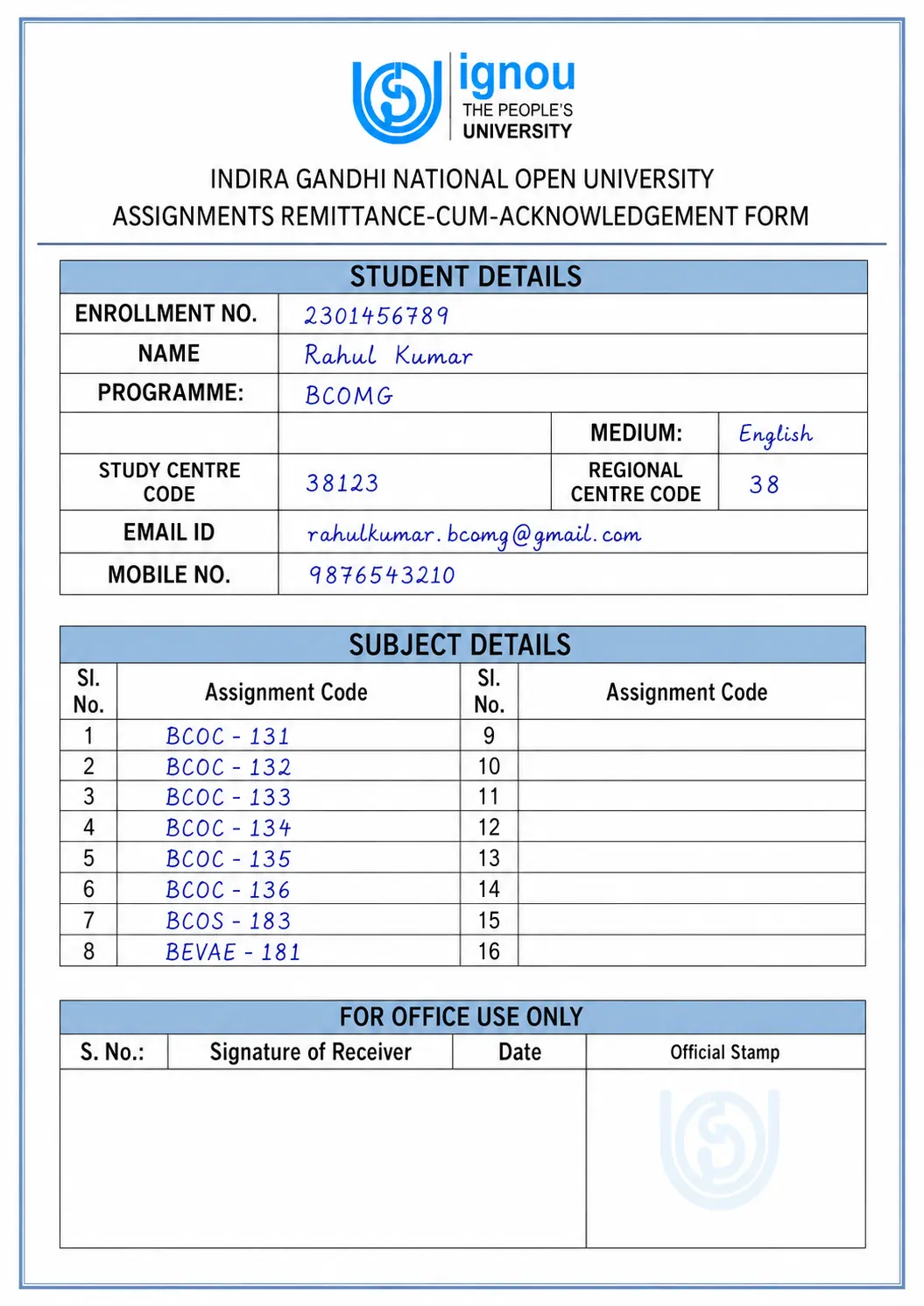
The sample is provided only to explain where the information should be written. Replace every example with your own details. Do not copy the sample enrolment number, email address, mobile number, centre codes or assignment codes.
| Field | What should be entered |
| Enrollment Number | Your own IGNOU enrolment number |
| Name | Your complete name as shown in the student record |
| Programme | Your enrolled programme code or programme title |
| Medium | English, Hindi or the medium applicable to your assignments |
| Study Centre Code | Your allotted Study Centre or Learner Support Centre code |
| Regional Centre Code | Your correct Regional Centre code |
| Email ID | An active email address |
| Mobile Number | An active mobile number |
| Assignment Codes | One applicable assignment code in each required row |
| For Office Use Only | Leave this section blank for the receiving staff |
What Is an IGNOU Assignment Submission Slip?
An IGNOU assignment submission slip is a form used to record the assignments handed over by a student. It contains the learner’s details, programme and centre information, contact details and the assignment codes being submitted.
The lower part of the form is reserved for the receiving office. When the staff enters the serial number, receiver’s signature, date and official stamp, the same form works as an acknowledgement of submission.
Students may also search for this document using names such as:
- IGNOU assignment acknowledgement slip
- IGNOU assignment receiving slip
- IGNOU assignment submission receipt
- IGNOU assignment submission form PDF
- IGNOU assignment acknowledgement form
The name used by a Study Centre may differ, but the purpose remains the same: keeping a record that the assignments were received.
When Does the Submission Slip Become Valid Proof?
A blank form or a slip filled only by the student does not confirm that the assignments were received. The slip becomes useful as submission proof after the receiving office acknowledges it.
The acknowledgement may include:
- Office serial number
- Receiver’s signature
- Date of receipt
- Official Study Centre stamp
- A receipt or token issued by the centre
Before leaving the centre, check that the date, signature and stamp are readable. Take a clear photograph or scan of the acknowledged slip as a backup.
Details Required on the IGNOU Assignment Submission Slip
The downloadable form contains the following fields:
| Field | What to enter |
| Enrollment Number | Your correct IGNOU enrolment number |
| Name | Your complete name as shown in your IGNOU record |
| Programme | The programme in which you are enrolled |
| Medium | Your applicable medium, such as English or Hindi |
| Study Centre Code | Your allotted Study Centre or Learner Support Centre code |
| Regional Centre Code | Your correct Regional Centre code |
| Email ID | Your active email address |
| Mobile Number | Your active mobile number |
| Assignment Codes | Enter one applicable assignment code in each required row |
| Office Serial Number | Leave this field for the receiving office |
| Signature of Receiver | To be completed by the receiving staff |
| Date | To be entered by the receiving staff |
| Official Stamp | To be added by the receiving office |
How to Fill the IGNOU Assignment Submission Slip
1. Enter Your Enrollment Number
Write your IGNOU enrolment number carefully and check every digit. Do not enter an application number, payment reference, control number or examination-form number in this field.
2. Write Your Complete Name
Enter your name exactly as it appears on your IGNOU ID card or student record. Avoid using a nickname, shortened name or different spelling.
3. Enter Your Programme
Write the programme code or title shown in your own IGNOU record. Do not copy a programme example from the filled sample.
Examples may include BAG, BCOMG, BSCG, BCA, MCA, MEG, MHD or MBA. These are examples only and may not match your programme.
4. Enter the Correct Medium
Write the medium applicable to the assignments, such as English or Hindi. The medium should match the assignment booklet and the answers being submitted.
5. Fill in the Study Centre and Regional Centre Codes
Write the Study Centre Code and Regional Centre Code in their separate fields. These are different codes, so check them carefully before filling the form.
The codes may be available in your student profile, ID card, admission details or information issued by your centre.
6. Add Your Email ID and Mobile Number
Enter an active email address and mobile number. Write them clearly so the receiving office can read the details without confusion.
7. List the Assignment Codes
The form provides 16 rows for Assignment Codes. Enter one applicable code in each row and make sure every assignment being handed over appears on the slip.
Copy each code exactly from the applicable assignment booklet. Do not use a code taken from another student, an earlier session or an unrelated assignment.
Assignment Code 1: Copy from your applicable assignment booklet
Assignment Code 2: Copy from your applicable assignment booklet
Assignment Code 3: Copy from your applicable assignment booklet
You do not need to fill all 16 rows. Leave the unused rows blank.
8. Leave the Office Section Blank
Do not write the office serial number, receiver’s signature, date or official stamp yourself. These fields must be completed by the staff accepting the assignments.
How to Get the Slip Signed and Stamped
Follow these steps when submitting assignments in hard copy:
- Download and print the submission slip on A4 paper.
- Fill in the student, programme, medium and centre details.
- Enter every applicable Assignment Code in the provided rows.
- Arrange the assignments in the same order as the codes written on the slip.
- Attach a separate IGNOU assignment front page to each assignment.
- Carry the assignments and slip to the centre mentioned in your applicable instructions.
- Hand over the assignments and slip to the receiving staff.
- Ask the receiver to add the office serial number, date, signature and official stamp.
- Check that the acknowledgement is readable before leaving.
- Take a clear photograph or scan and keep the original safely.
If the centre gives you its own receipt, token or computer-generated acknowledgement, keep that document. You do not need to insist on the downloaded format when the centre already has its own receipt system.
Can One Slip Be Used for Multiple Assignments?
The downloadable form contains 16 rows for Assignment Codes, so several assignments can be recorded on one slip. Enter one code in each row and check that every assignment handed over is listed.
A Study Centre may still ask students to follow a different procedure or use its own acknowledgement format. Follow the instructions of the centre accepting your assignments.
What If the Study Centre Uses Its Own Receipt?
Some Study Centres use their own register, receipt, token, stamped photocopy or computer-generated acknowledgement.
In that situation, keep the proof issued by the centre. Before leaving, check whether it contains enough information to connect it with your submission, such as:
- Enrolment number
- Assignment codes
- Date of submission
- Study Centre identification
- Receiver’s signature or official stamp
The acknowledgement matters more than the design of the form. A downloaded slip without a signature, date, stamp or centre-issued confirmation is not complete proof of receipt.
Do Online Assignment Submissions Need This Slip?
The downloadable paper slip is mainly intended for hard-copy submission. When a Regional Centre or Study Centre permits online submission, follow the instructions given on its upload form, email notice or submission page.
After submitting online, save whatever confirmation is available:
- Google Form response confirmation
- Submission acknowledgement page
- Confirmation email
- Copy of the sent email with attachments
- Screenshot showing the submission date
- Copy of the uploaded assignment files
Do not submit the same assignment through both online and offline modes unless the concerned centre specifically asks you to do so.
What Proof Should You Keep for Postal Submission?
Confirm with the concerned Study Centre before sending assignments by post or courier because acceptance procedures and postal addresses can differ.
When postal submission is permitted, keep:
- Postal or courier receipt
- Tracking number and delivery status
- Photocopy or scanned copy of the assignments
- Copy of the filled submission slip
- Any acknowledgement returned by the centre
A delivery confirmation shows that the parcel reached its destination. A signed or stamped acknowledgement provides a clearer record of the assignments received.
How to Check Assignment Status After Submission
The acknowledged slip records the submission, but it does not mean that the assignment entry or marks have already been processed.
Check the available entry through the IGNOU Assignment Status page. Enter your enrolment number and programme code to view the available information.
If an assignment does not appear after the centre has had sufficient time to process it, contact the concerned centre with:
- Your enrolment number
- Programme details
- Missing Assignment Code
- Date of submission
- Copy of the signed or stamped slip
- Online, postal or courier proof when applicable
Common Mistakes to Avoid
Writing the Wrong Enrollment Number
Check every digit against your IGNOU ID card or student profile before submitting the form.
Entering the Wrong Programme
Use the programme shown in your own IGNOU record. Do not copy the example programme from the filled sample.
Leaving Out an Assignment Code
Compare the assignments in your file with the codes written on the slip. Every assignment being handed over should appear in the Subject Details section.
Using an Old Assignment Code
Do not copy a code from an assignment prepared for an earlier session. Use the code printed on the applicable assignment booklet.
Filling the Office Section Yourself
Leave the serial number, receiver’s signature, date and official stamp fields for the receiving staff.
Leaving Without an Acknowledgement
A self-filled slip alone does not prove receipt. Collect a signed, dated, stamped or otherwise verifiable acknowledgement.
Losing the Original Slip
Take a clear photograph or scan as soon as the slip is acknowledged. Keep the original in a safe and dry place.
Sharing Personal Details Publicly
Do not upload your complete enrolment number, mobile number, email address or signed slip in public comments or social-media groups.
Checklist Before Leaving the Study Centre
Check these points before leaving:
- Your enrolment number is correct.
- Your name and programme details are readable.
- The medium has been entered correctly.
- The Study Centre and Regional Centre codes are not interchanged.
- Every Assignment Code has been copied from the applicable assignment booklet.
- Every assignment handed over appears on the slip.
- The office serial number has been entered when applicable.
- The receiver has signed the slip.
- The submission date is visible.
- The official stamp is readable.
- You have photographed or scanned the acknowledged slip.
- You have kept a copy of the submitted assignments.
Taking one minute to check the receipt can prevent confusion later if an assignment entry is delayed or missing.
How Long Should You Keep the Submission Slip?
Keep the acknowledged slip until the assignment entry and marks appear correctly in your status or grade card and any related issue has been resolved.
Keeping a digital copy for a longer period is also sensible. A clear photograph or scanned PDF takes little storage and can help if the original paper is damaged or misplaced.
Useful IGNOU Guides
- IGNOU Degree Certificate Download: Samarth and DigiLocker
- IGNOU Date Sheet December 2026 – Search Exam Date by Course Code
- IGNOU Helpline Number: Contact Details by Issue
- IGNOU PhD Admission: Eligibility, Entrance Test, Fees & Selection Process
- How to Write IGNOU Assignment: Format, Pattern & Writing Style
IGNOU Assignment Submission Slip FAQs
Where can I download the IGNOU Assignment Submission Slip PDF?
You can download the printable IGNOU Assignment Submission Slip PDF from this page. Print it on A4 paper and complete the student and assignment details before submission.
Is the IGNOU assignment submission slip compulsory?
You should collect and retain proof whenever you submit assignments. The exact acknowledgement format may differ because a Study Centre can use its own receipt or collection process.
Can I use one slip for multiple assignments?
The downloadable form provides 16 rows for Assignment Codes. Follow your Study Centre’s instructions if it asks for a different format or issues its own receipt.
Is a self-filled slip valid without a Study Centre stamp?
A self-filled blank slip alone does not confirm receipt. Obtain a receiver’s signature, date, official stamp, token or another acknowledgement issued by the centre.
Who should complete the office section?
The office serial number, receiver’s signature, date and official stamp must be completed by the staff accepting the assignments.
Do online assignment submissions need the paper slip?
Follow the instructions of the applicable online submission system. Save the confirmation page, response receipt, sent email or another digital proof provided after submission.
What should I do if my assignment status is not updated?
Check that you entered the correct enrolment number and programme details. If the entry remains missing after processing, contact the concerned centre with your acknowledgement and assignment information.
How long should I keep the acknowledged slip?
Keep it until the assignment entry and marks appear correctly and any related issue has been resolved. Keeping a scanned copy for a longer period is advisable.
2 thoughts on “IGNOU Assignment Submission Slip 2026 – PDF Download and Filling Guide”
Thanks a lot for ass submissions slip
Assignment submit